ChronoScan Enterprise

Enterprise OCR and document scanning software for high-volume, multi-user processing on a scalable client/server infrastructure.
ChronoScan Enterprisecentral server
Scan stationsscanners & MFPs
Browser usersthin web client
Desktop clientsChronoScan Capture
Jobs, batches & usersone shared repository
OCR & processingruns on the server
Exportto your systems
chronoscan.yourcompany.com
BackFiltersNotesHelpReprocess
Pending tasks
Doc. 1 ✔
Doc. 2
DocumentSupplier
Header
Document type
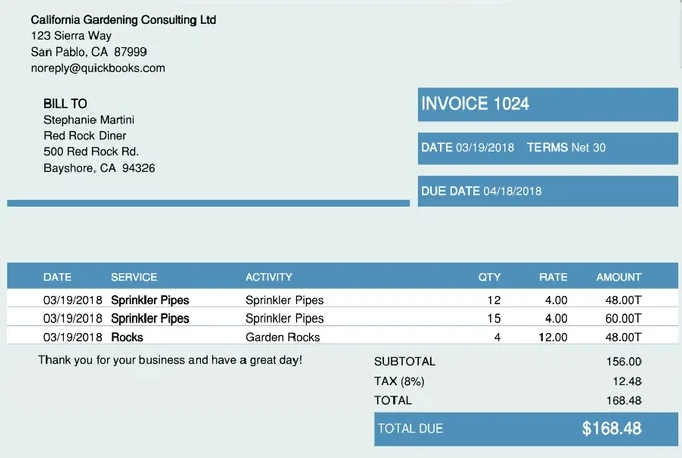
California Garde...
Supplier
California Garde...
Invoice number
1024
Invoice date
03/19/2018
Due date
04/18/2018
Invoice totals
Net total
156.00
Tax total
12.48
Invoice total
168.48
Currency
USD
Batch 'Invoices_October' of job 'AP JOB (ENG)' - 6 document(s), 8 image(s)
In the browser
Indexing & validation
Zones & data capture
No desktop install
chronoscan.yourcompany.com
ChronoScan EnterprisePanelDocumentosLotesTrabajosUsuariosEspañol ▾
AtrásFiltrosNotasAyuda
Cabecera
Tipo de documento
California Gardening
Proveedor
California Gardening
Número de factura
1024
Fecha de factura
19/03/2018
Fecha de vencimiento
18/04/2018
Totales de la factura
Base imponible
156,00
Impuestos
12,48
Total factura
168,48
Lote 'Facturas_Octubre' - 6 documento(s), 8 imagen(es)
English
Español
Deutsch
Français
Italiano
Português
Polski
...
Each user, their language
Switch on the fly
Same server, mixed teams
30+ languages
chronoscan.yourcompany.com
ChronoScan EnterpriseDashboardDocumentsBatchesJobsUsersEntitiesTemplatesReportsadmin
Link local jobSync job Use drag & drop to add users
AP JOB (ENG)
Configuration
Workflow
Users
Fields
Document types
Notifications
Input
Processing options
Export options
Stats
PO JOB
HR FILES
Users that can create batches
AadminEeditorI1Indexer 1
Pre-classification users
O1Operator 1O2Operator 2
Post-classification users
EeditorI1Indexer 1
Document type editors
Eeditor
Manual data entry and error correction users
I1Indexer 1I2Indexer 2O1Operator 1
Document approval
Aadmin
Who does what
Roles per job
One role per workflow step
Approval step
From input to export, unattended
Inputhot folder · email · scan
OCRfull page & zones
Classificationdocument type
Extractionfields & lines
Validationonly when needed
ExportXML · CSV · DMS
  Batch Invoices_October · 128 documents118 exported automatically
Scheduled tasks Hot folders IMAP mailboxes 10 waiting for an operator
Users & scan stations
Web serverthin client interface
Processing serverOCR & data extraction
Automation serverhot folders & tasks
Shared database & storageone ChronoScan Enterprise system
Add servers as you grow
Redundancy
Job queue
Invoices_October
Delivery notes 11/17
HR files - scan 3
Purchase orders
Mailroom AM
ChronoScan Enterprisedistributes the jobs
Server 164%
Server 258%
Server 361%
Peak workloads absorbed
  System events
Batch ready for validation
Invoices_October · 128 documents
09:12
Export finished
Delivery notes 11/17
08:47
Documents need attention
Purchase orders · 4 documents
08:30
New batch received
Mailroom AM · hot folder
08:02
Batch "Invoices_October" is ready for validation
From: ChronoScan Enterprise  ·  To: AP validation team

The batch Invoices_October of job AP JOB (ENG) has finished processing.

118
processed automatically
10
waiting for validation
Open batch
Automated emails
Administrators & users
  invoices@yourcompany.com
Supplier accounts09:10
Invoice 1024 - March
invoice_1024.pdf
Warehouse scanner08:55
Delivery notes
scan_0117.pdf scan_0118.pdf
Customer service08:31
Signed order form
order_form.tif
chronoscan.yourcompany.com
ChronoScan EnterpriseDashboardDocumentsBatchesadmin
BatchSourceDocsStatus
Email - Invoice 1024 - MarchIMAP1Processed
Email - Delivery notesIMAP2Processed
Email - Signed order formIMAP1Processing...
Mailroom AMHot folder42Exported
Invoices_OctoberScanner128Exported
Attachments become batches
Submit by email
chronoscan.yourcompany.com
ChronoScan EnterpriseDashboardDocumentsBatchesJobsUsersEntitiesTemplatesReportsadmin
New viewReport 1Report 2
Period
Last 6 months
Jobs
AP JOB (ENG)
PO JOB
HR FILES
Users
All users
Activity
Batches
Documents
UserDateActivityJobSeconds
Indexer 111/17 09:12Document validatedAP JOB (ENG)13
Operator 111/17 09:10Batch createdPO JOB5
editor11/17 09:07Document type changedAP JOB (ENG)70
Indexer 211/17 09:03Document validatedAP JOB (ENG)9
4003002001000JunJulAugSepOctNov Documents processedValidated by usersBatches
Every action, measured
User actions logged
Process times
Ready for billing
chronoscan.yourcompany.com
BackValidate
Invoice totals
Net total
156.00
Tax total
12.48
Invoice total
168.48
Currency
USD
Totals match the detail lines
IdDetails lineQuantityUnit priceLine total
1Sprinkler Pipes124.0048.00
2Sprinkler Pipes154.0060.00
3Garden Rocks412.0048.00
Full tools, no plug-ins
View, zoom, rotate
Edit fields & line grids
Validate in the browser
Your scannerTWAIN, on the user's PC
chronoscan.yourcompany.com
ChronoScan EnterpriseDashboardDocumentsBatchesoperator
Scan to a new batch
ScannerTWAIN document scanner Resolution300 dpi ModeColor, duplex
Scan 3 pages received
ChronoScan Enterprisebatch created on the server
chronoscan.yourcompany.com
ChronoScan EnterpriseDashboardDocumentsBatchesJobsUsersEntitiesTemplatesReportsadmin
New userEdit userAssign entitiesDelete user
UserTypee-mailActiveEntity
adminadminadmin@yourcompany.com✔All
editoreditoreditor@yourcompany.com✔All
Indexer 1indexerindexer1@yourcompany.com✔Finance
Operator 1operatoroperator1@yourcompany.com✔Mailroom
Operator 2operatoroperator2@yourcompany.com—Mailroom
SessionsRefreshKill sessionSend message
UserStatusIPStarted
Indexer 1/IndexView10.0.4.2111/17 08:02
Operator 1/Dashboard10.0.4.3711/17 08:15
admin/Users10.0.4.211/17 09:01
Access under control
User types & roles
Access by entity & job
Live sessions

Client/Server Architecture — centralise processing power while reducing IT administration costs.

Thin Client Interface — powerful data capture and extraction without heavy desktop applications.

Multilingual GUI — switch languages on-the-fly for international users.

User Role Support — full control for user capabilities and roles within the system.

Automated Workflow — automate input, processing and output end-to-end.

Multiple Servers — distribute services across individual servers for increased redundancy and scalability.

Server Load Balancing — distribute jobs across multiple servers to handle peak workloads.

Notifications Engine — keep everybody informed of system processes with automated notifications.

IMAP Client — allows users and clients to submit documents directly via email.

Logging & Statistics — log user actions and process times for statistical analysis or billing.

High Speed Browser Editing — fully featured viewing, editing and validation tools in the browser.

Cloud Scanning Client — scan directly into ChronoScan without additional software.

Security — control document and data access with powerful user role controls.

Enterprise OCR and Scanning Software

ChronoScan Enterprise is OCR server software for teams. OCR, barcode reading and data extraction run centrally on your own servers, while users scan, validate and index documents from the browser with nothing to install on each PC.

Documents arrive from scanners, multifunction devices, hot folders and email, move through a workflow with user roles, and can be spread across several servers when volume grows. See Enterprise licensing.