ChronoScan Enterprise

Enterprise-Software für OCR und Dokumentenscan: Verarbeitung mit hohem Volumen und mehreren Benutzern auf einer skalierbaren Client/Server-Infrastruktur.

Die neue Weboberfläche

Ein Rundgang durch die Neuerungen im Webclient. Er läuft automatisch; zum Anhalten mit der Maus darüberfahren oder die Reiter verwenden.

Beta. Die neue Oberfläche ist in der Vorabversion 1.0.4.25 verfügbar; die aktuelle offizielle Version ist 1.0.3.84. Zum Ausprobieren fordern Sie die Vorabversion bei unserem Support an: support@chronoscan.org
Pre-release 1.0.4.25 · Beta

A new web interface

Cleaner, lighter and easier to read. The same tools and workflows, with a new look on every page.

  • Chosen per user: the classic theme is still there
  • Around 245 new line icons
ChronoScan Enterprise
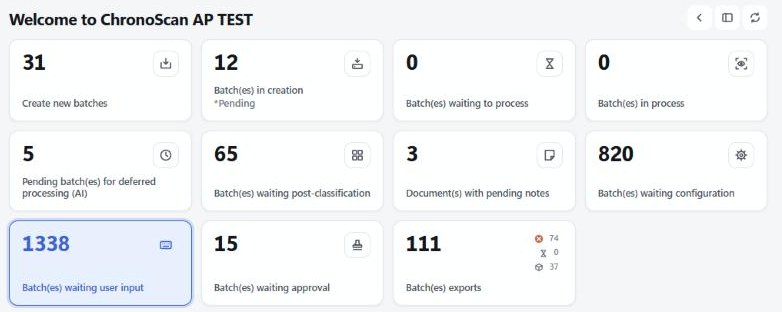
A new web interface Trays with live counters
Dashboard

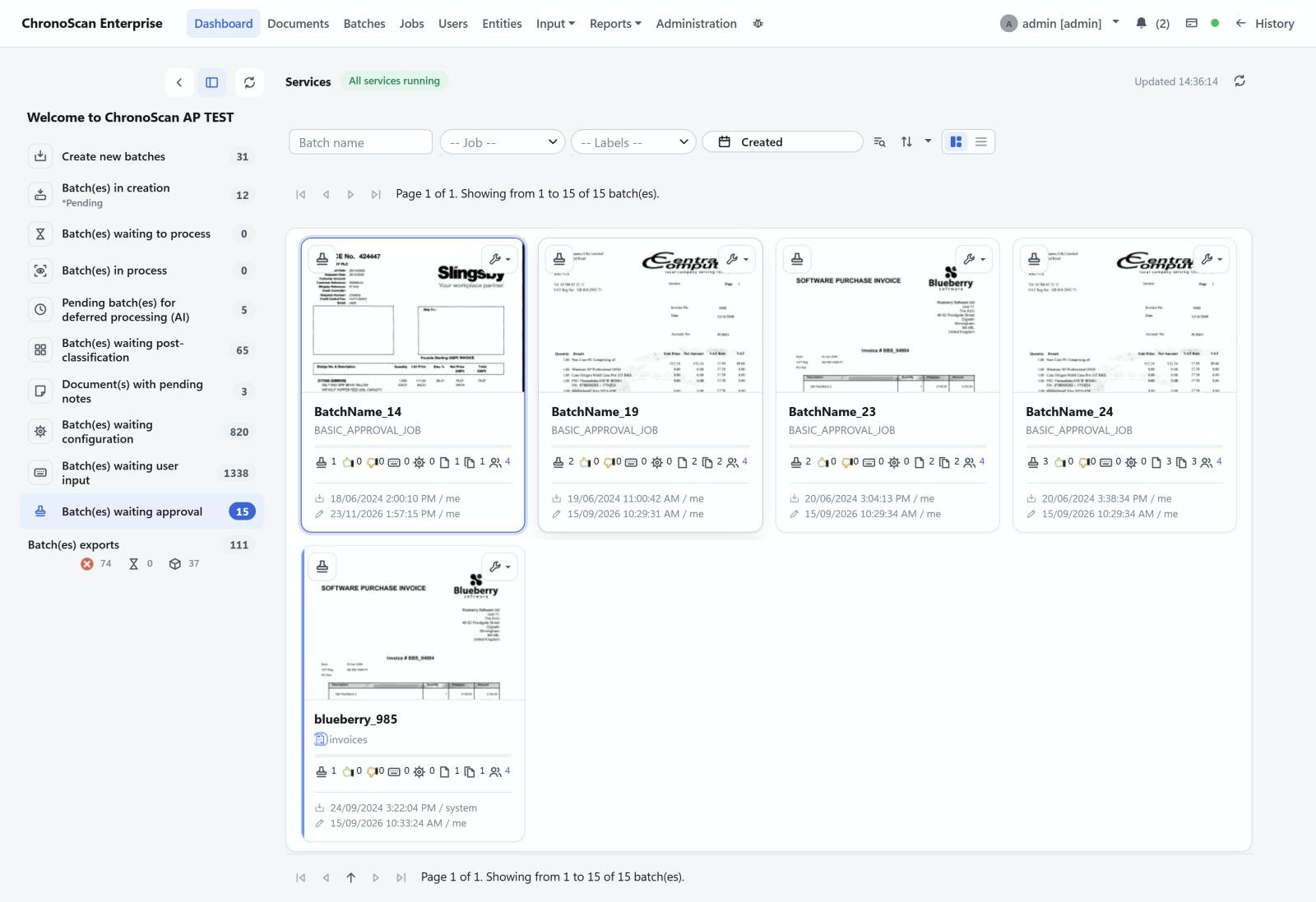
Batches as cards or as a list

Every batch shows its first page, its status and its counters.

  • A compact list is one click away
  • Trays on the left or on top
ChronoScan Enterprise
Batches as cards or as a list
New · Dashboard

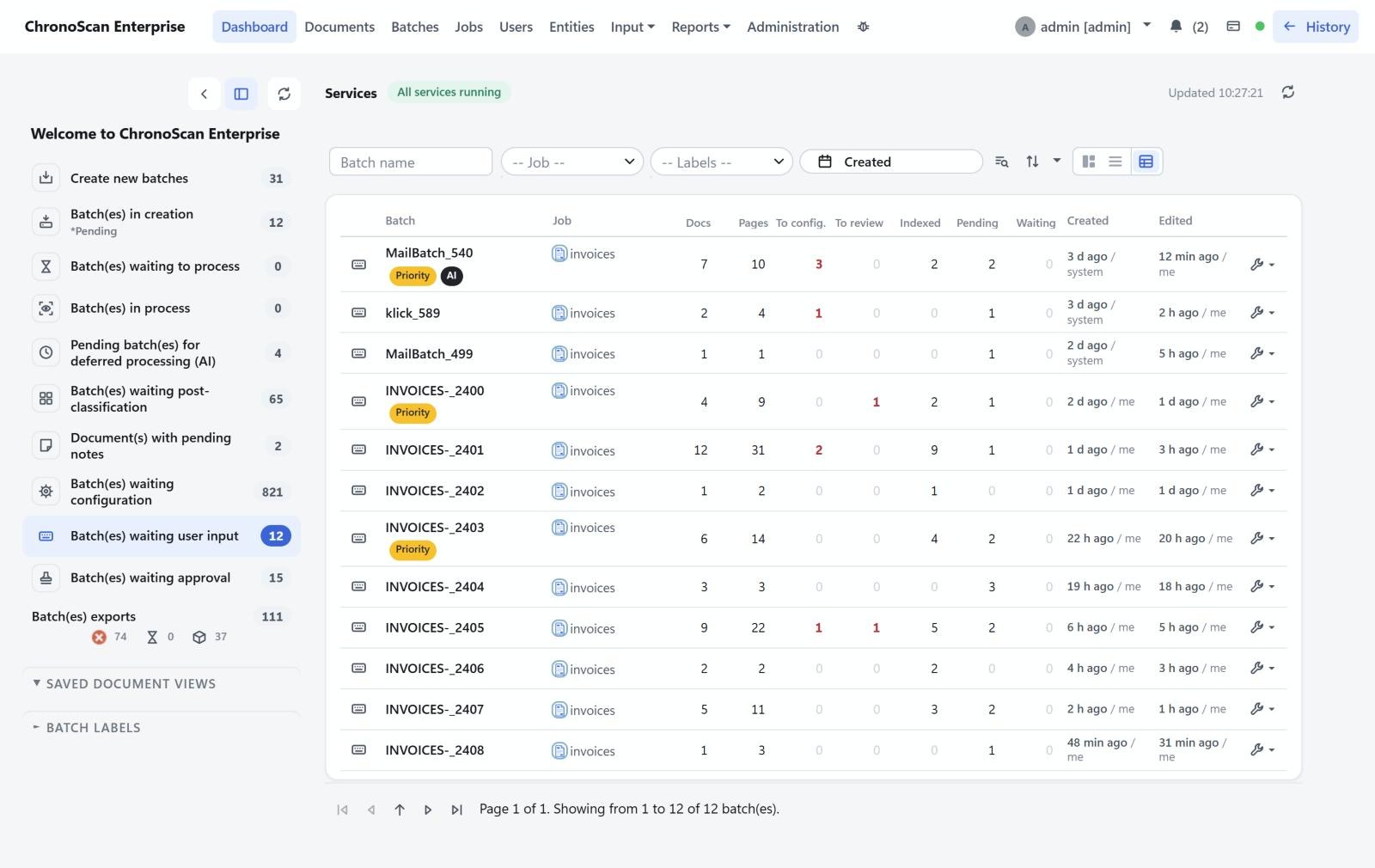
A table view for your trays

One batch per line: documents, pages, what is waiting for review, and when it was created and edited.

  • Click a header to sort
  • Cards, list and table share one switch
ChronoScan Enterprise
A table view for your trays
Dashboard

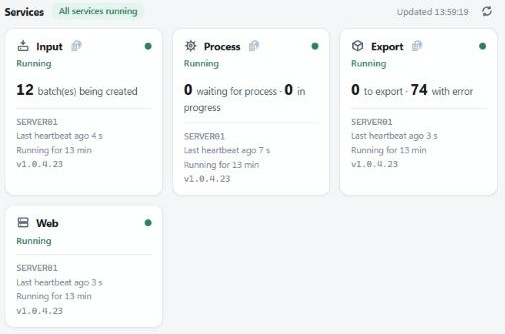
Service status at a glance

Input, processing, export and web in one panel. Each card opens the diagnosis page of its service.

  • Green when everything is running
ChronoScan Enterprise
Service status at a glance Live status
New · Dashboard

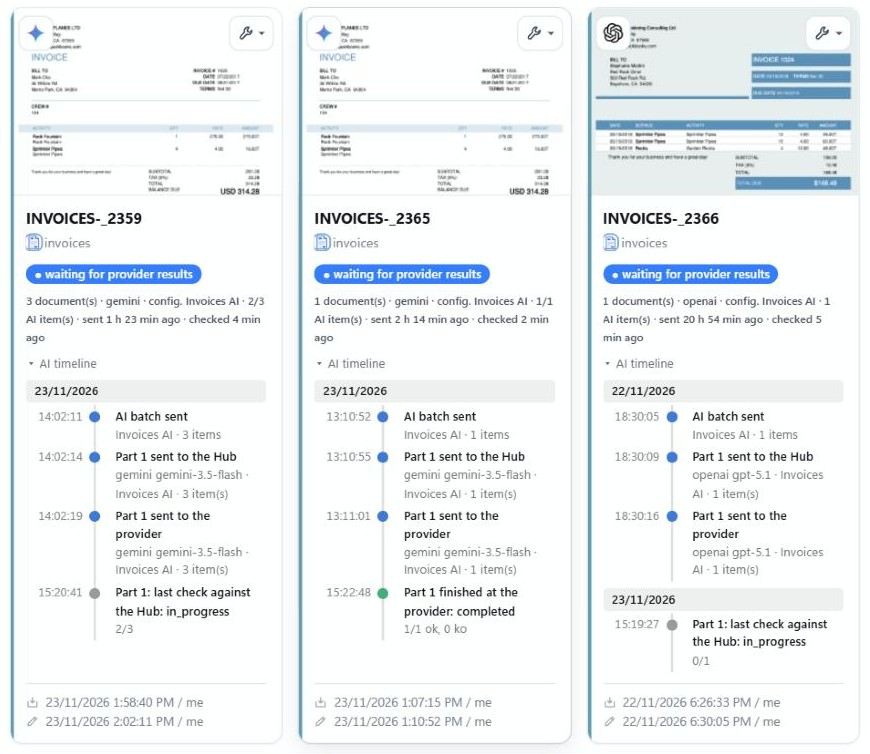
Follow your deferred AI batches

Batches sent to AI in deferred mode have their own tray, with the provider and the progress of each one.

  • A timeline of every step
  • Results are applied on their own
ChronoScan Enterprise
Follow your deferred AI batches
Its own tray
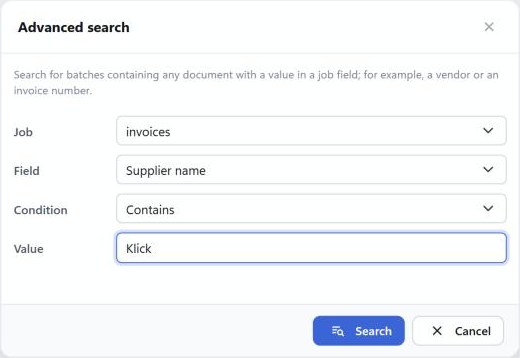
Advanced search

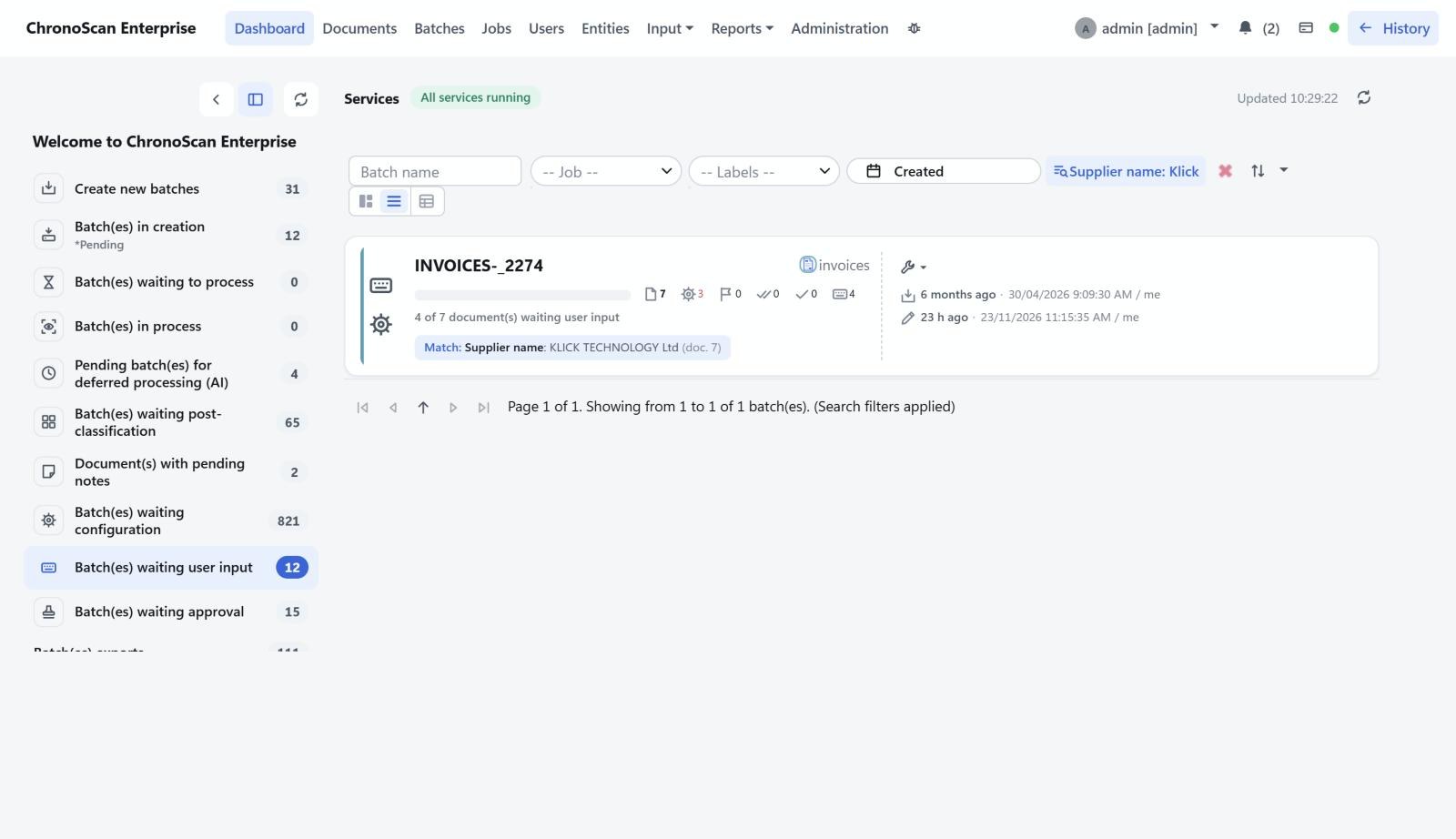
Find batches by what is inside

Search the batches of a job by the value of any field: a supplier, an invoice number, a date.

  • Each batch says what matched, and where
ChronoScan Enterprise
Find batches by what is inside Why it is listed
New · History panel

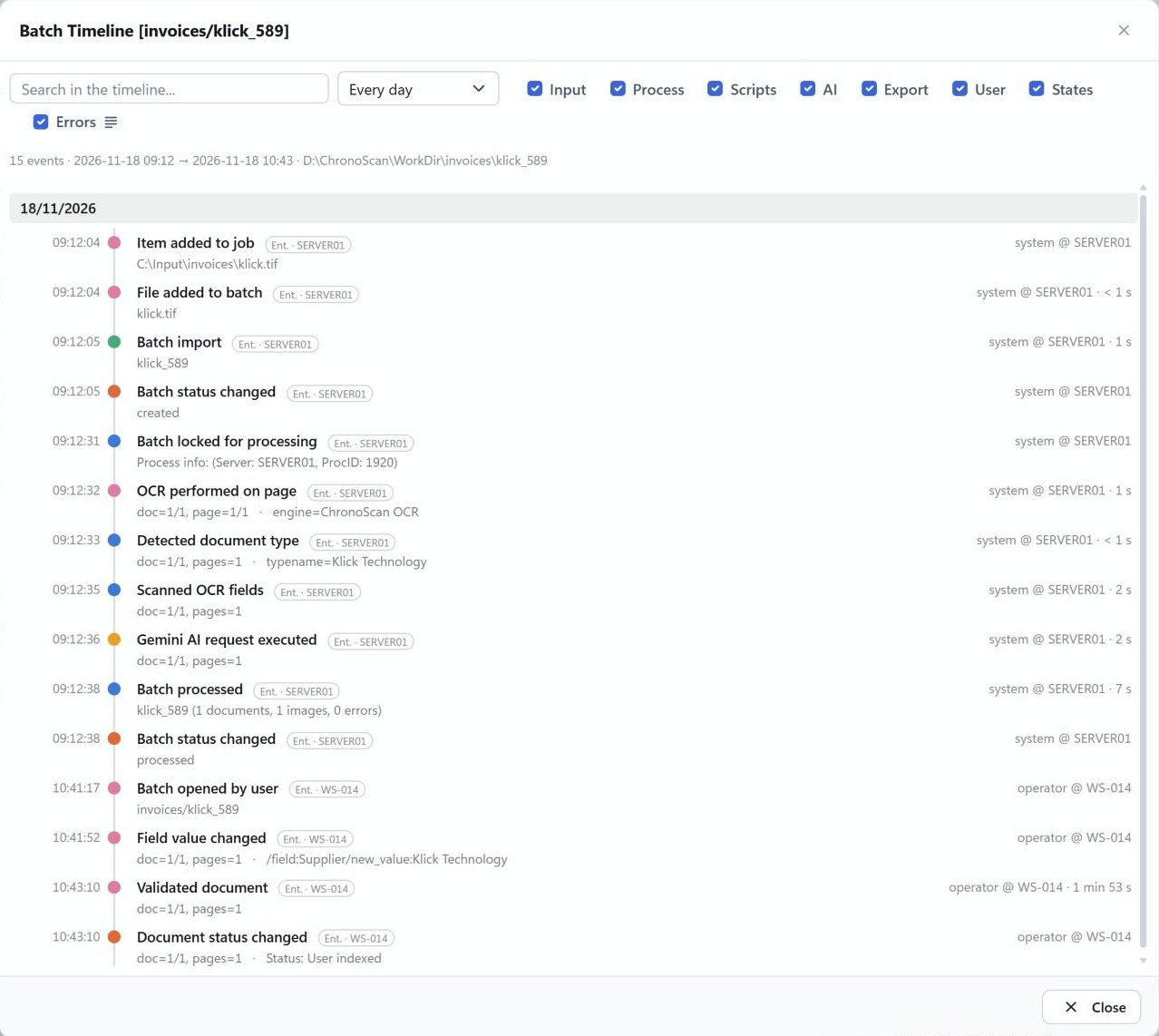
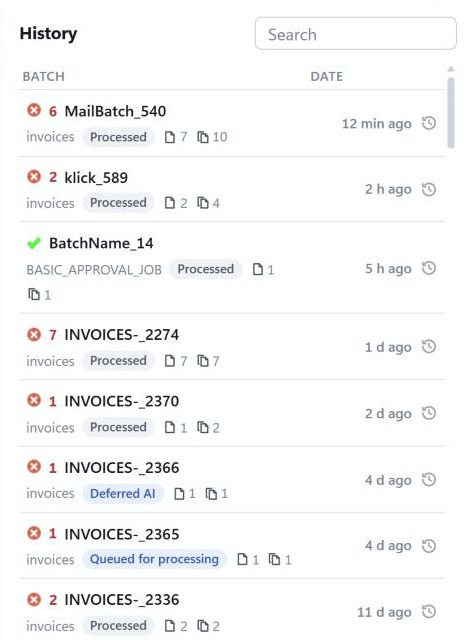
What happened to this batch

Every step of a batch in plain words, from import to validation: who did it, where, and how long it took.

  • Filter by step, user or errors
ChronoScan Enterprise
What happened to this batch
From the History panel
Indexing view

Everything in its place

The document, its fields and the line table, together on one tidy screen.

  • Line icons and a grouped toolbar
  • Green when the batch is ready
ChronoScan Enterprise
Everything in its place
Simplified interface

Fewer, larger buttons for operators

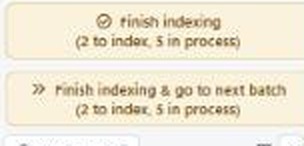
Close, finish, or finish and go to the next batch. The document takes the center of the screen.

  • The finish buttons say what is still pending
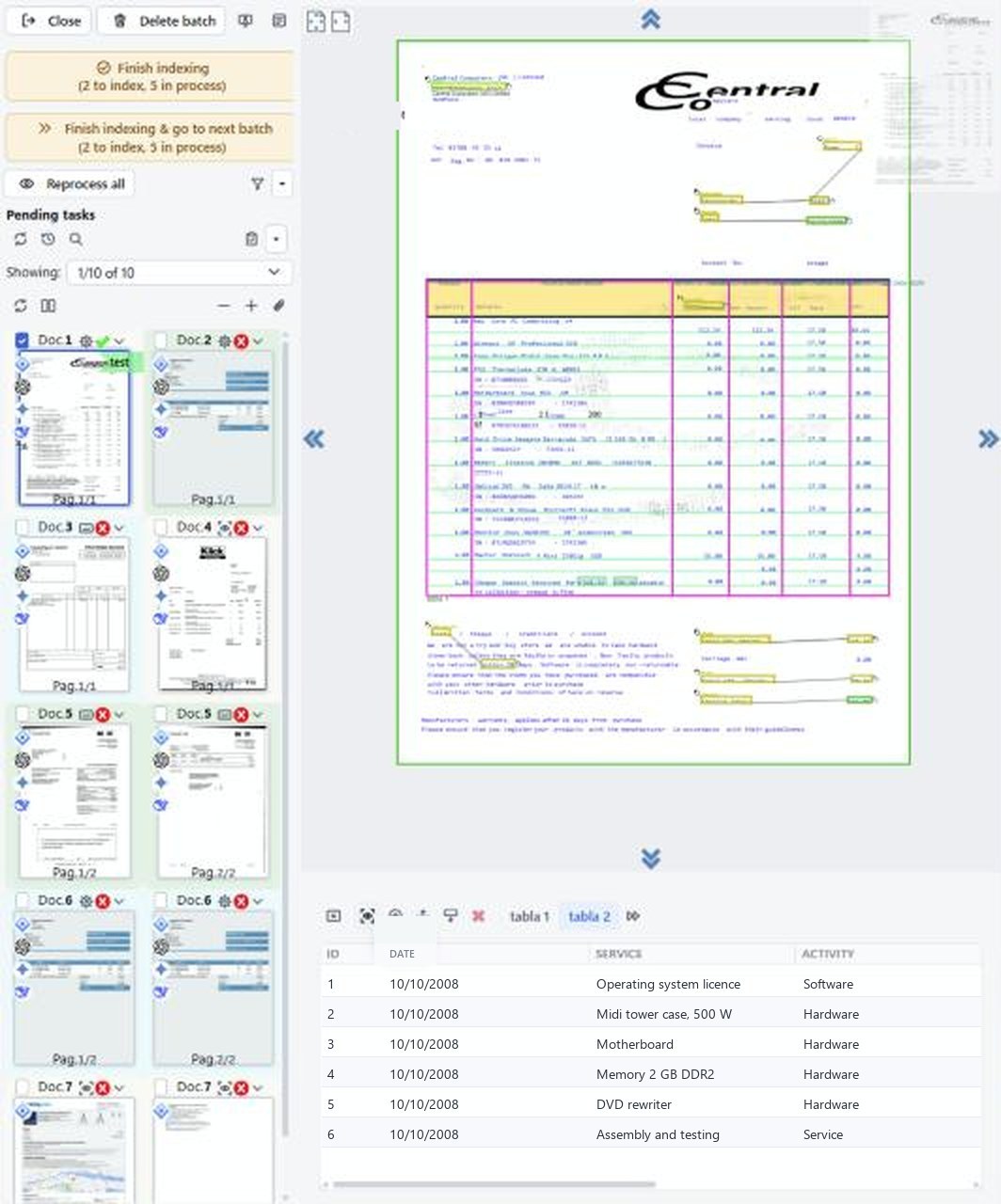
ChronoScan Enterprise
Fewer, larger buttons for operators
Finish buttons, magnified
New

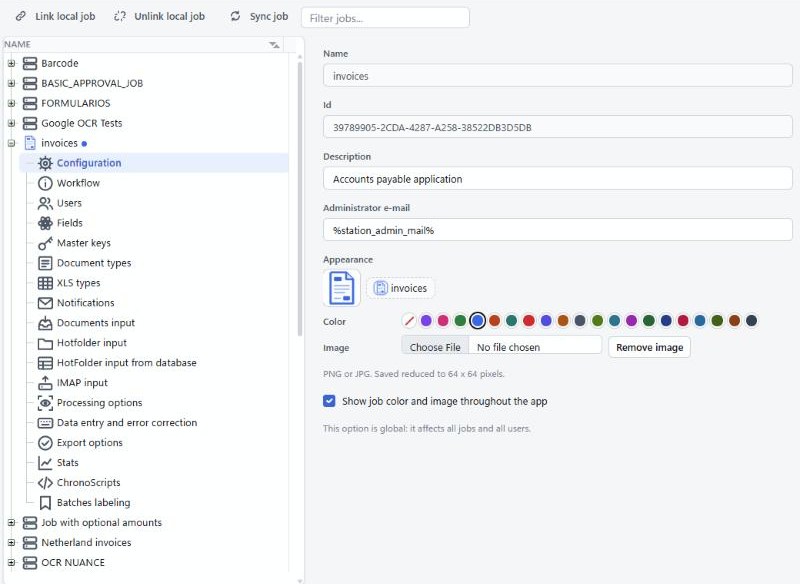
A color and an image for each job

Jobs and users get their own color, and it follows the name across the dashboard, the tables and the reports.

  • Jobs: switched on by an administrator
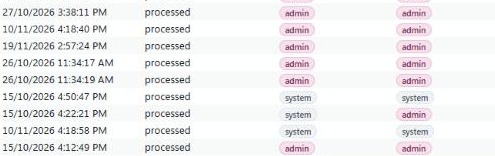
  • Users: soft-colored chips
ChronoScan Enterprise
A color and an image for each job
User chips
Help where you need it

A guided tour, and clearer messages

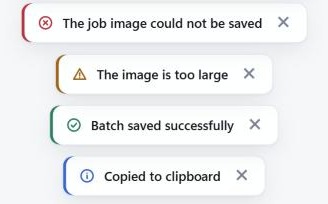
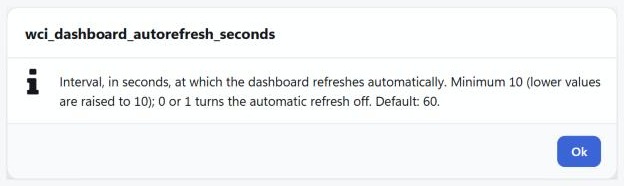
A short tour shows each user what is new, and every system parameter explains itself.

  • Notifications show their type at a glance
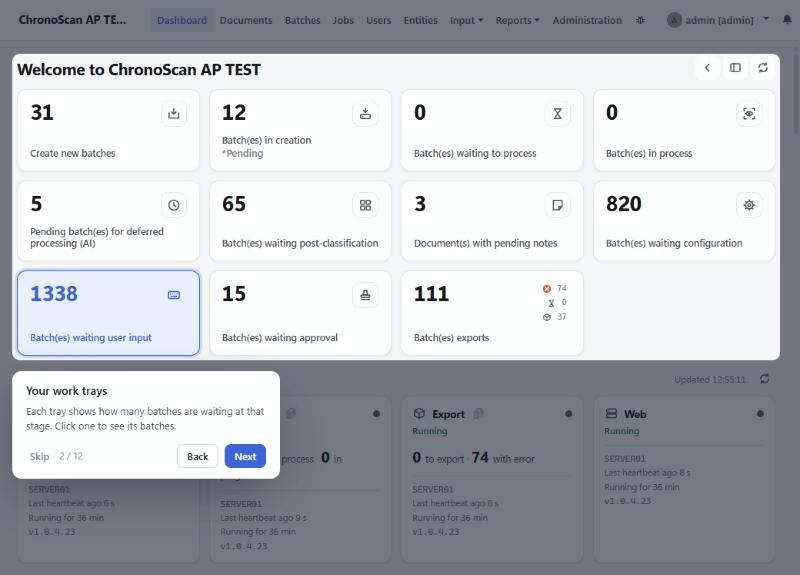
ChronoScan Enterprise
A guided tour, and clearer messages
Per user

Your theme, your language

Each user picks a theme and a language from the user menu, and can go back to the classic interface at any time.
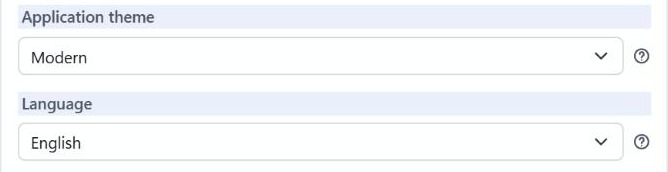
Pre-release 1.0.4.25 · Beta

Try the new interface

The new interface is in beta in the pre-release 1.0.4.25 (the official release is 1.0.3.84). Ask our support team to try it.

support@chronoscan.org

ChronoScan Enterprisezentraler Server
Scan-StationenScanner & MFPs
Browser-Benutzerschlanker Web-Client
Desktop-ClientsChronoScan Capture
Jobs, Stapel & Benutzerein gemeinsames Repository
OCR & Verarbeitungläuft auf dem Server
Exportin Ihre Systeme
chronoscan.yourcompany.com
BackFiltersNotesHelpReprocess
Pending tasks
Doc. 1 ✔
Doc. 2
DocumentSupplier
Header
Document type
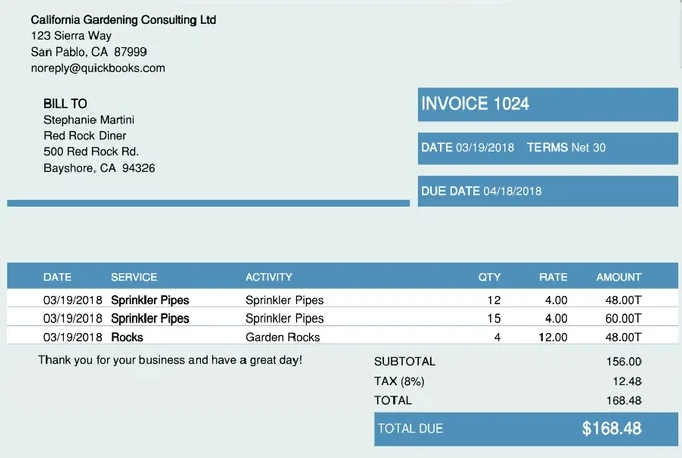
California Garde...
Supplier
California Garde...
Invoice number
1024
Invoice date
03/19/2018
Due date
04/18/2018
Invoice totals
Net total
156.00
Tax total
12.48
Invoice total
168.48
Currency
USD
Batch 'Invoices_October' of job 'AP JOB (ENG)' - 6 document(s), 8 image(s)
Im Browser
Indexierung & Validierung
Zonen & Datenerfassung
Keine Desktop-Installation
chronoscan.yourcompany.com
ChronoScan EnterprisePanelDocumentosLotesTrabajosUsuariosEspañol ▾
AtrásFiltrosNotasAyuda
Cabecera
Tipo de documento
California Gardening
Proveedor
California Gardening
Número de factura
1024
Fecha de factura
19/03/2018
Fecha de vencimiento
18/04/2018
Totales de la factura
Base imponible
156,00
Impuestos
12,48
Total factura
168,48
Lote 'Facturas_Octubre' - 6 documento(s), 8 imagen(es)
English
Español
Deutsch
Français
Italiano
Português
Polski
...
Jeder Benutzer in seiner Sprache
Wechsel im laufenden Betrieb
Ein Server, gemischte Teams
Über 30 Sprachen
chronoscan.yourcompany.com
ChronoScan EnterpriseDashboardDocumentsBatchesJobsUsersEntitiesTemplatesReportsadmin
Link local jobSync job Use drag & drop to add users
AP JOB (ENG)
Configuration
Workflow
Users
Fields
Document types
Notifications
Input
Processing options
Export options
Stats
PO JOB
HR FILES
Users that can create batches
AadminEeditorI1Indexer 1
Pre-classification users
O1Operator 1O2Operator 2
Post-classification users
EeditorI1Indexer 1
Document type editors
Eeditor
Manual data entry and error correction users
I1Indexer 1I2Indexer 2O1Operator 1
Document approval
Aadmin
Wer macht was
Rollen pro Job
Eine Rolle pro Workflow-Schritt
Freigabeschritt
Vom Eingang bis zum Export, unbeaufsichtigt
EingangHot Folder · E-Mail · Scan
OCRVollseite & Zonen
KlassifizierungDokumenttyp
ExtraktionFelder & Positionen
Validierungnur bei Bedarf
ExportXML · CSV · DMS
  Stapel Invoices_October · 128 Dokumente118 automatisch exportiert
Geplante Aufgaben Hot Folder IMAP-Postfächer 10 warten auf einen Bediener
Benutzer & Scan-Stationen
WebserverThin-Client-Oberfläche
VerarbeitungsserverOCR & Datenextraktion
AutomatisierungsserverHot Folder & Aufgaben
Gemeinsame Datenbank & Speicherein ChronoScan-Enterprise-System
Server nach Bedarf hinzufügen
Redundanz
Job-Warteschlange
Invoices_October
Delivery notes 11/17
HR files - scan 3
Purchase orders
Mailroom AM
ChronoScan Enterpriseverteilt die Jobs
Server 164%
Server 258%
Server 361%
Lastspitzen abgefangen
  System events
Batch ready for validation
Invoices_October · 128 documents
09:12
Export finished
Delivery notes 11/17
08:47
Documents need attention
Purchase orders · 4 documents
08:30
New batch received
Mailroom AM · hot folder
08:02
Batch "Invoices_October" is ready for validation
From: ChronoScan Enterprise  ·  To: AP validation team

The batch Invoices_October of job AP JOB (ENG) has finished processing.

118
processed automatically
10
waiting for validation
Open batch
Automatische E-Mails
Administratoren & Benutzer
  invoices@yourcompany.com
Supplier accounts09:10
Invoice 1024 - March
invoice_1024.pdf
Warehouse scanner08:55
Delivery notes
scan_0117.pdf scan_0118.pdf
Customer service08:31
Signed order form
order_form.tif
chronoscan.yourcompany.com
ChronoScan EnterpriseDashboardDocumentsBatchesadmin
BatchSourceDocsStatus
Email - Invoice 1024 - MarchIMAP1Processed
Email - Delivery notesIMAP2Processed
Email - Signed order formIMAP1Processing...
Mailroom AMHot folder42Exported
Invoices_OctoberScanner128Exported
Anhänge werden zu Stapeln
Einreichen per E-Mail
chronoscan.yourcompany.com
ChronoScan EnterpriseDashboardDocumentsBatchesJobsUsersEntitiesTemplatesReportsadmin
New viewReport 1Report 2
Period
Last 6 months
Jobs
AP JOB (ENG)
PO JOB
HR FILES
Users
All users
Activity
Batches
Documents
UserDateActivityJobSeconds
Indexer 111/17 09:12Document validatedAP JOB (ENG)13
Operator 111/17 09:10Batch createdPO JOB5
editor11/17 09:07Document type changedAP JOB (ENG)70
Indexer 211/17 09:03Document validatedAP JOB (ENG)9
4003002001000JunJulAugSepOctNov Documents processedValidated by usersBatches
Jede Aktion gemessen
Benutzeraktionen protokolliert
Verarbeitungszeiten
Bereit zur Abrechnung
chronoscan.yourcompany.com
BackValidate
Invoice totals
Net total
156.00
Tax total
12.48
Invoice total
168.48
Currency
USD
Totals match the detail lines
IdDetails lineQuantityUnit priceLine total
1Sprinkler Pipes124.0048.00
2Sprinkler Pipes154.0060.00
3Garden Rocks412.0048.00
Alle Werkzeuge, ohne Plug-ins
Anzeigen, zoomen, drehen
Felder & Positionsraster bearbeiten
Im Browser validieren
Ihr ScannerTWAIN, am PC des Benutzers
chronoscan.yourcompany.com
ChronoScan EnterpriseDashboardDocumentsBatchesoperator
Scan to a new batch
ScannerTWAIN document scanner Resolution300 dpi ModeColor, duplex
Scan 3 pages received
ChronoScan EnterpriseStapel auf dem Server erstellt
chronoscan.yourcompany.com
ChronoScan EnterpriseDashboardDocumentsBatchesJobsUsersEntitiesTemplatesReportsadmin
New userEdit userAssign entitiesDelete user
UserTypee-mailActiveEntity
adminadminadmin@yourcompany.com✔All
editoreditoreditor@yourcompany.com✔All
Indexer 1indexerindexer1@yourcompany.com✔Finance
Operator 1operatoroperator1@yourcompany.com✔Mailroom
Operator 2operatoroperator2@yourcompany.com—Mailroom
SessionsRefreshKill sessionSend message
UserStatusIPStarted
Indexer 1/IndexView10.0.4.2111/17 08:02
Operator 1/Dashboard10.0.4.3711/17 08:15
admin/Users10.0.4.211/17 09:01
Zugriff unter Kontrolle
Benutzertypen & Rollen
Zugriff nach Entität & Job
Aktive Sitzungen

Client/Server-Architektur: Rechenleistung zentralisieren und IT-Verwaltungskosten senken.

Thin-Client-Oberfläche: leistungsstarke Datenerfassung und -extraktion ohne schwere Desktop-Anwendungen.

Mehrsprachige Oberfläche: Sprache im laufenden Betrieb wechseln für internationale Benutzer.

Benutzerrollen: volle Kontrolle über Benutzerrechte und Rollen im System.

Automatisierter Workflow: Eingang, Verarbeitung und Ausgabe durchgängig automatisieren.

Mehrere Server: Dienste auf einzelne Server verteilen für mehr Redundanz und Skalierbarkeit.

Lastverteilung über Server: Jobs auf mehrere Server verteilen, um Lastspitzen zu bewältigen.

Benachrichtigungs-Engine: alle mit automatischen Benachrichtigungen über Systemprozesse informieren.

IMAP-Client: Benutzer und Kunden können Dokumente direkt per E-Mail einreichen.

Protokollierung und Statistiken: Benutzeraktionen und Verarbeitungszeiten für statistische Auswertung oder Abrechnung protokollieren.

Schnelle Bearbeitung im Browser: vollständige Werkzeuge zum Anzeigen, Bearbeiten und Validieren im Browser.

Cloud-Scan-Client: direkt in ChronoScan scannen, ohne zusätzliche Software.

Sicherheit: Zugriff auf Dokumente und Daten mit leistungsstarken Rollenrechten steuern.

Enterprise-Software für OCR und Scannen

ChronoScan Enterprise ist OCR-Serversoftware für Teams. OCR, Barcode-Erkennung und Datenextraktion laufen zentral auf Ihren eigenen Servern, während Benutzer Dokumente im Browser scannen, validieren und indexieren – ohne Installation auf jedem PC.

Dokumente kommen von Scannern, Multifunktionsgeräten, überwachten Ordnern und per E-Mail, durchlaufen einen Workflow mit Benutzerrollen und lassen sich bei wachsendem Volumen auf mehrere Server verteilen. Zur Enterprise-Lizenzierung.