A machine is a device on which ChronoScan registers its application. Registration is done from ChronoScan over the network, with the device administrator credentials; nothing is installed by hand on the device.
In the Machines group click Add.
Fill in the machine data (below).
Click Test connection. It checks that the device answers and that the credentials are valid, and asks the device what it is: the Machine information column then shows its model, software version and EIP version, for example "Xerox AltaLink C8230 Multifunction Printer, software 120.014.003.09301, EIP 5.2.1". That information is kept with the machine and refreshed by every test and registration. If the device is older than EIP 3.0, ChronoScan warns that it cannot show the ChronoScan screens and the status says "Not supported".
Click Register. ChronoScan asks the device the same and, if it is not supported, asks for confirmation before going on. Then it registers its application on the device. The Registered server and Registration Date columns are filled in, and the ChronoScan button appears on the device home screen (on some models after a few seconds, or after pressing the home button).
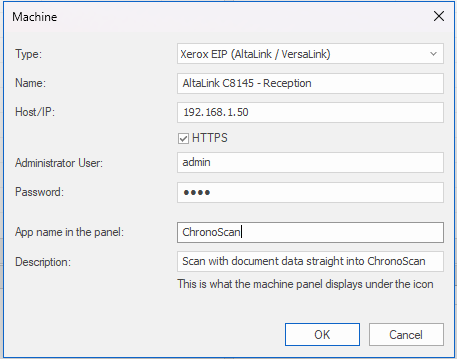
The Machine dialog.
Type: Xerox EIP (AltaLink / VersaLink). Other device types are added as drivers of the same service.
Name: how the machine is shown in ChronoScan. It is also available in batch names as the %scanner% variable. Commas are not allowed.
Host/IP: the device address, IP or name. Leave HTTPS checked unless the device has HTTPS disabled.
Administrator User and Password of the device. The password is stored encrypted (Windows DPAPI) in the plug-in configuration file; it is used only to test and to register.
App name in the panel: the text under the ChronoScan icon on the device home screen (default: ChronoScan). It can differ per machine.
Description: registered on the device together with the name (default: "Scan with document data straight into ChronoScan"). The Xerox home screen shows only the name. To put a text on the screens of ChronoScan itself, use the description of each capture configuration.
Repeat for each device. Register can be used again at any time, for example after the server name changes: machines whose Registered server differs from the current server URL are marked "(different from current)"; if the device already has a ChronoScan registration (an earlier server, or one made by hand), it is replaced. Edit opens the dialog again; Remove deletes the machine from the list. To take the ChronoScan button off the device, right-click the machine and choose Unregister: the machine stays in the list, ready to be registered again.
A registered machine: status, registered server, registration date and last scan.
The machines list shows, for each device, its type and address, the result of the last test or registration (Status), what the device reported about itself the last time (Machine information: model, software and EIP version), the server URL it was registered with and when, and the date of the last scan received from it.
If the button does not appear on the device: check the two Extensible Services settings of the requirements, reboot the device, and make sure the device can open http://<server>:8580 (firewall).